Managing Connection Limits: Best Practices
Last updated: September 23, 2026
The Social Platform may temporarily restrict your ability to send connection requests if they detect behavior that seems suspicious based on their internal algorithms.
Here are some best practices to help avoid those limits:
Start with a Low Daily Volume
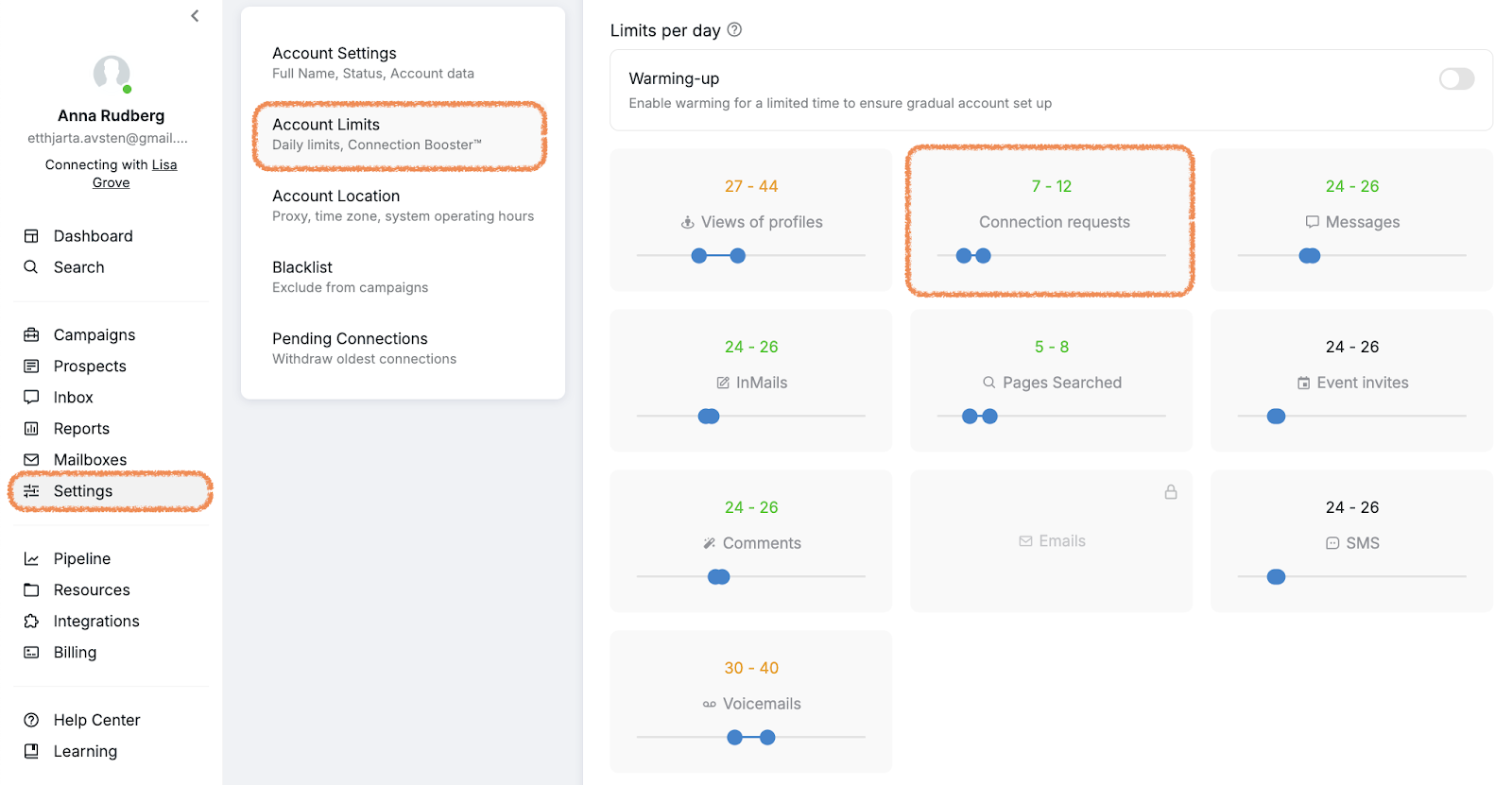
Begin by sending just 5–7 connection requests per day. Then, slowly increase that number over time. To adjust your daily connection limits in Buzz, go to Settings > Account Limits.
Monitor the risk indicators in your Account Limits settings. If you see orange indicators, this signals a higher risk of hitting LinkedIn's limits. In this case, reduce your daily limits for both profile views and connection requests until the indicators turn green. Once the indicators are green and you're no longer experiencing restrictions, you can gradually increase your limits again.
LinkedIn Daily Limits by Account Type
While the general best practice is to start with 5–7 connection requests per day and gradually increase, the following are specific safe daily limits based on your LinkedIn account type.
Basic (Free LinkedIn)
Connection requests: 15–25 per day
Messages to first connections: 30–50 per day
Profile views: 80–120 per day
Follows: 20–40 per day
Sales Navigator
Connection requests: 25–40 per day
Messages to first connections and InMails: 50–80 per day
Profile views: 150–250 per day
InMails: according to your monthly quota, usually 50–150 per month depending on your plan
Recruiter / Recruiter Lite
Connection requests: 30–50 per day
Messages: 60–100 per day
Profile views: 200–300 per day
InMails: based on your subscription quota
Important: These are maximum safe limits, not targets. Always prioritize acceptance rates, ideally 30% or higher, and spread activity throughout the day instead of sending requests in bulk.
Key Considerations for Account-Specific Limits
Premium accounts: Sales Navigator and Recruiter accounts generally have higher thresholds due to their paid status and expected business use.
Account verification: Unverified accounts are substantially more likely to receive permanent restrictions rather than temporary ones when flagged for unusual activity.
Acceptance rate monitoring: If your acceptance rate drops below 30%, reduce your daily volume regardless of account type.
Activity distribution: Spreading activity throughout the day is more important than simply staying under daily limits, so avoid bulk sending.
Account age: Newer accounts are more likely to face permanent restrictions if flagged for unusual activity, so avoid using newly created accounts for automation.
Add Random Delays
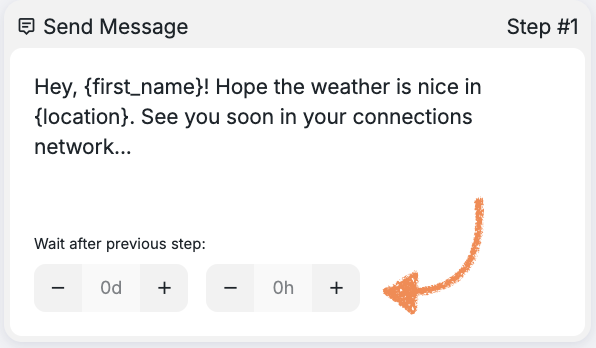
Add delays between actions in your outreach campaigns to mimic natural user behavior. You can configure these delays for each step in your campaign workflow:
Mix in More Organic Activity
Engage in actions that mimic real user behavior like visiting profiles or interacting with content. If you're using the Connection Request Booster, consider turning it off to allow Buzz to generate more natural activity while sending connection requests.
Personalize Your Connection Requests
The Social Platform is usually more lenient with requests that include a thoughtful, personalized message instead of a default “Connect” button. In Buzz, you can easily add personalization using placeholders to tailor your messages.
Take Breaks or Warm Up the Account
If you’re often restricted, pause your outreach for 7–10 days. During this time, focus on regular manual activity (for example, browsing and engaging with profiles) to help reset how the platform views your account.
Focus on Quality Over Quantity
Instead of mass outreach, try a more targeted approach. For example, send 20–30 connection requests per week to a well-defined audience with a high chance of engagement.
Verify Your Social Profile
Verified accounts typically face fewer restrictions and are generally seen as more trustworthy by the platform.
Use InMails as an Alternative
If your connection requests are still getting restricted, try sending InMails instead, especially if you have a Sales Navigator subscription. InMails allow you to message even closed profiles, as long as you have available credits.
🚫 Things to Avoid:
Starting with high daily request volumes, especially on new or previously restricted accounts.
Using the same personalized message across all campaigns. Instead, create variations using tools like Spintax to keep your messaging fresh and more human.
Disregarding platform warnings. Continuing outreach without making adjustments may lead to additional roadblocks down the line, so it’s best to adapt your strategy when needed.
Logging in from different regions or countries than where your automation is running. Keep your login locations consistent to avoid triggering security checks.
Allowing automation errors that cause loops or unnatural activity patterns. Ensure your campaigns run smoothly without glitches that could trigger platform detection.
Note: If you receive LinkedIn's “unusual activity” prompt asking whether you're using automation, your response typically does not significantly change the outcome. The platform will usually require you to log back in regardless of your answer.