Using Fallback in Placeholders
Last updated: September 23, 2026
A fallback is a default value that is inserted when the primary field (placeholder) does not contain any data.
This is especially useful when you are not sure whether a particular field will always be filled in. Using a fallback helps avoid awkward-looking messages or blank spaces in your outreach.
How the Syntax Works
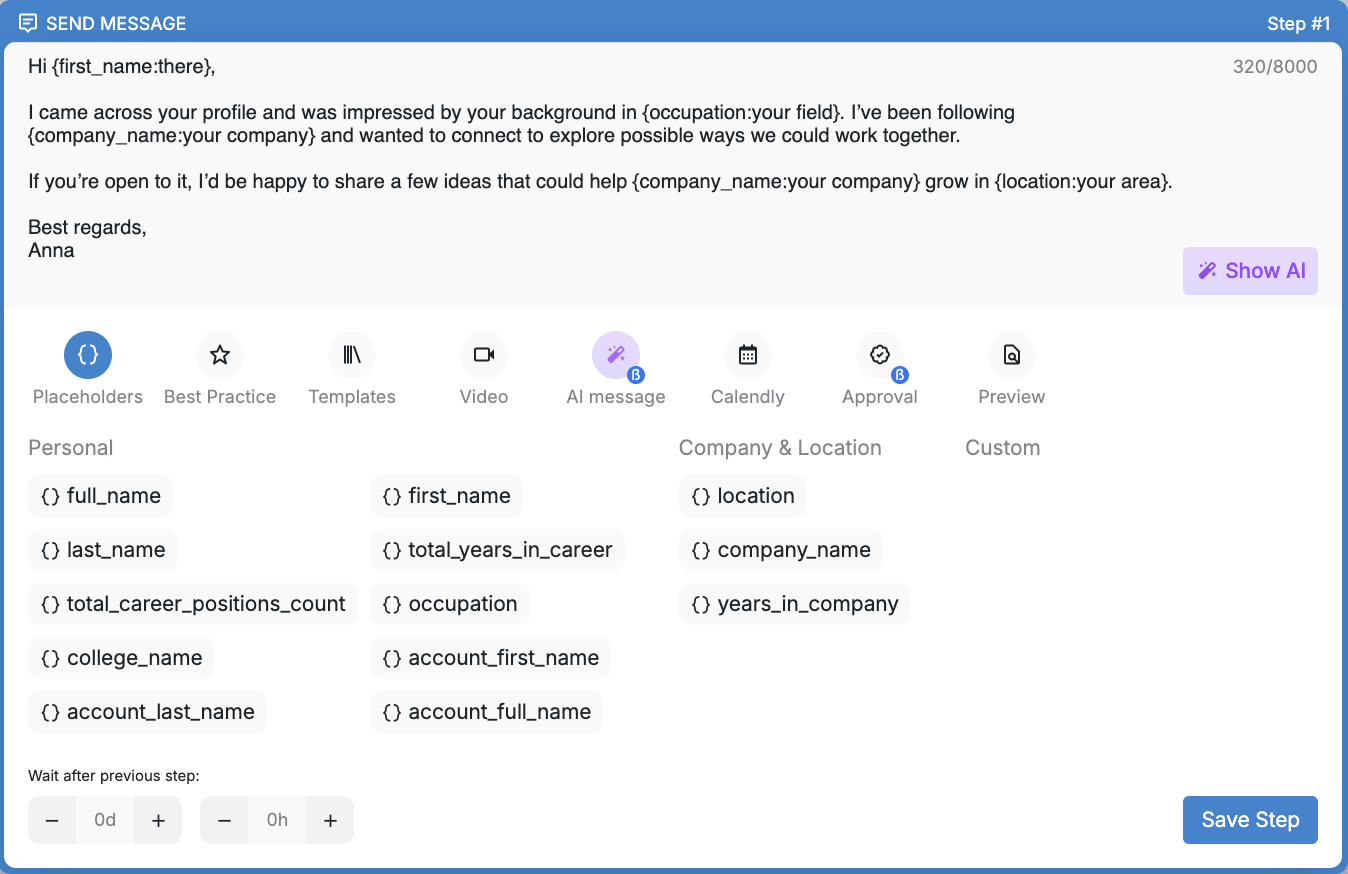
Within Buzz, a placeholder with a fallback will look like this — {placeholder:fallback_value}
Placeholder is the main value Buzz will try to insert.
Fallback_value is the default value that will be used if the main value is missing.
Examples
Greeting by Name
If you’d like to personalize your message with a prospect’s name but aren’t certain the system will find it, you can add a fallback like this:
Hi {first_name:there}!
If Buzz successfully finds the
first_namevalue, your message is going to look like this → Hi Anna!If the
first_name valueis missing, the text will instead look like this → Hi there!
Company Name with a Fallback
"I noticed {company_name:your company} has been expanding recently."
With the company name detected: I noticed Acme Corp has been expanding recently.
Without the company name: I noticed your company has been expanding recently.
Advanced Fallback Use Case: Suppressing Specific Field Values
Fallbacks can also help you intentionally replace specific field values that are present but unwanted. For example, you can avoid mentioning information such as a college name when it might be inappropriate or create unwanted associations.
I see you attended {college_name:your school}.
With the college name detected: I see you attended Harvard University.
With the fallback applied: I see you attended your school.
When to Use Value Suppression
Specific institutional names might create bias or unwanted associations.
Field values could be too formal or informal for your message tone.
You want consistent messaging regardless of data quality or appropriateness.
Certain details might distract from your main message.
This expands fallback usage beyond handling missing data to strategic content control, giving you more precise messaging control in your outreach campaigns.
Things to Keep in Mind
Fallback works only inside placeholders. It is not related to Spintax.
You can use another placeholder as the fallback value.
Where You Can Use Fallback
Fallback is supported in all campaign steps where placeholders are available:
Send Connection Request
Send Email
Send InMail
Send Message
Send SMS (temporarily unavailable)
Tips for Using Fallback
Choose fallback values that keep your messages natural and friendly.
Make sure your fallback matches the tone and context of your message to avoid any grammatical inconsistencies.
If you have any questions about using fallback in Buzz, feel free to contact our Customer Support team — we’re always happy to help!