Connection Request Booster: Maximize Your Outreach
Last updated: September 23, 2026
In this article, we'll walk you through what the Connection Request Booster does, how to activate it, and when it’s most useful.
Whether you’re scaling your outreach or trying to save time, this tool can make a big difference in how efficiently you connect with prospects.
What is the Connection Request Booster?
The Connection Request Booster helps you send connection requests more efficiently. While our system always sends connection requests on your behalf, enabling the booster allows it to do so without actually visiting each Social Profile — saving your Views of Profiles limit in the process.
It’s particularly helpful when you're reaching out to profiles that typically require an email to connect. This feature bypasses that limitation, so you can keep your outreach going without interruptions.
How to Turn It On
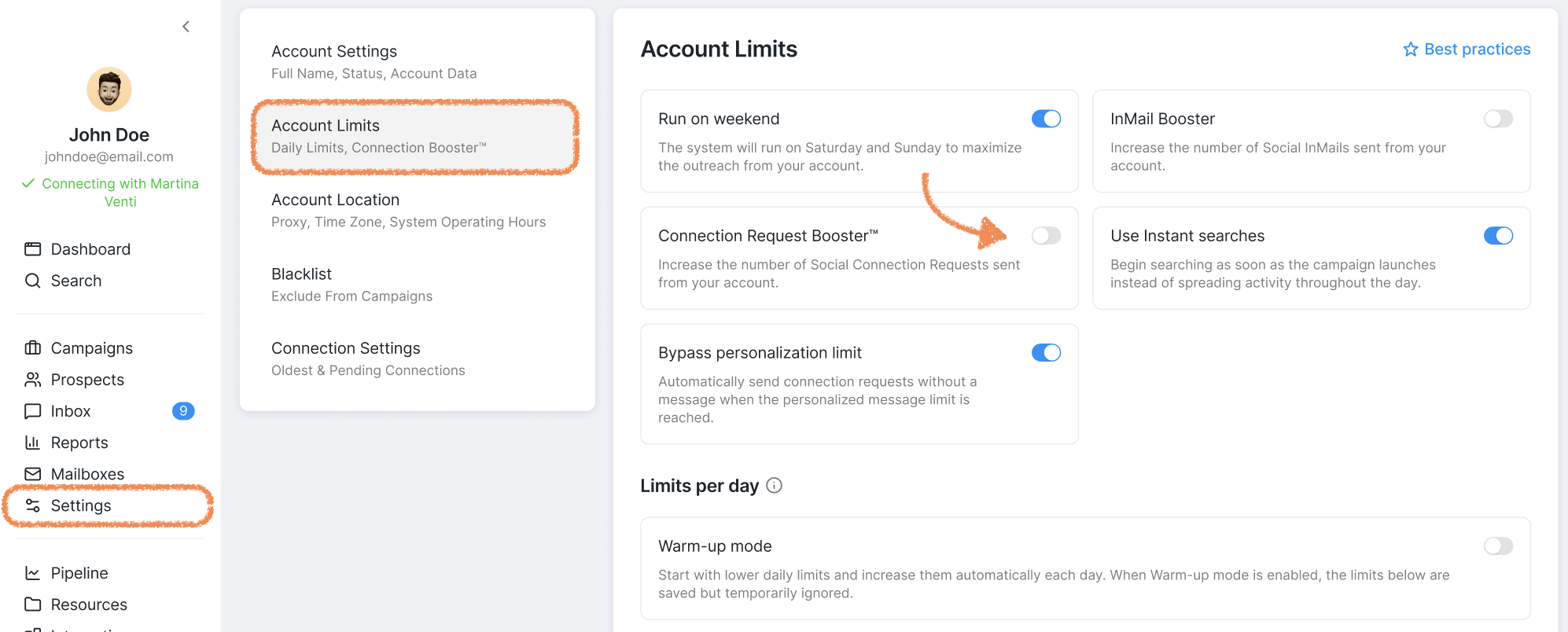
You can activate the booster by going to Settings > Account Limits.
In this same location, you can also configure the number of connection requests sent per day. Adjust the Connection requests setting to increase or decrease your daily limit based on your outreach needs.
Keep in mind that your daily connection request limit is the maximum number of requests the system can send, not a guarantee that it will send that many. The actual number depends on having enough eligible prospects in the Send connection request step. If fewer requests are being sent than your limit allows, check that you have sufficient prospects who are not paused, delayed, pending, or withdrawn. To increase your outreach volume, try generating more leads, removing delays from the Send connection request step, or reviewing prospects in paused status.
🖇 Please note: Enabling the booster slightly increases the overall activity level on your account. While this typically runs smoothly, elevated activity may occasionally draw attention from the Social Platform’s automated systems. It’s not usually a cause for concern, just something to keep in mind as you scale your outreach.
If LinkedIn limits your connection requests, you can:
Reduce the number of connection requests sent per day.
Wait until the limitation is lifted.
Temporarily turn off the booster, since elevated activity can increase the chances of account restrictions.
When to Use the Booster
If you see a prospect move to “Pending” with the message Active Connection Booster required to send CR or NEEDS API BOOSTER, that’s a clear sign the booster is needed to complete the request. Turning it on will ensure those pending requests go through seamlessly.
Prefer not to activate the booster? No problem. If you have a Premium Social Subscription, you can also try reaching out via InMail instead.
Connection Request Booster: Safe Daily Limits by Account Type
While the Connection Request Booster helps send requests more efficiently, it doesn’t eliminate LinkedIn’s own limits or compliance checks. To maintain account health and avoid restrictions, follow these safe daily limits based on your account type:
Basic (Free): 15–25 connection requests per day
Sales Navigator: 25–40 connection requests per day
Recruiter/Recruiter Lite: 30–50 connection requests per day
Additional Safety Guidelines
Keep your acceptance rate healthy, ideally at 30% or higher.
Warm up new or recently reactivated accounts gradually.
Avoid sudden spikes in activity.
Monitor for any platform warnings or restrictions.
Even with the booster enabled, exceeding these recommended limits can trigger account restrictions because platform compliance systems still monitor overall connection request patterns regardless of the sending method used.
Need help or have more questions about optimizing your outreach? Our Customer Support team is here for you — send us a message anytime!