Rerun Searches
Last updated: September 23, 2026
Added new prospects to your saved Sales Navigator list? Changed any campaign settings? Troubleshooting why your campaign is not pulling prospects? Note: Rerun Searches only resolves issues related to search processing and missing prospects from your lists. If your campaign is stuck or not sending, first check your account settings (credit limits, permissions, etc.) before rerunning searches. If your search is marked as "finished" but you've added more prospects to the same search link, rerunning the search will fetch those new profiles. Here's a best practice to help resolve that.
Rerun Searches enables the system to revisit and reprocess search lists that were previously reviewed.
This feature is particularly useful when you're working with a list that has already been searched but may have recently been updated with new prospects. By rerunning the search, the platform ensures that no new additions are overlooked, allowing you to capture all available prospects.
Here’s how to use it:
Head to your Campaigns tab.
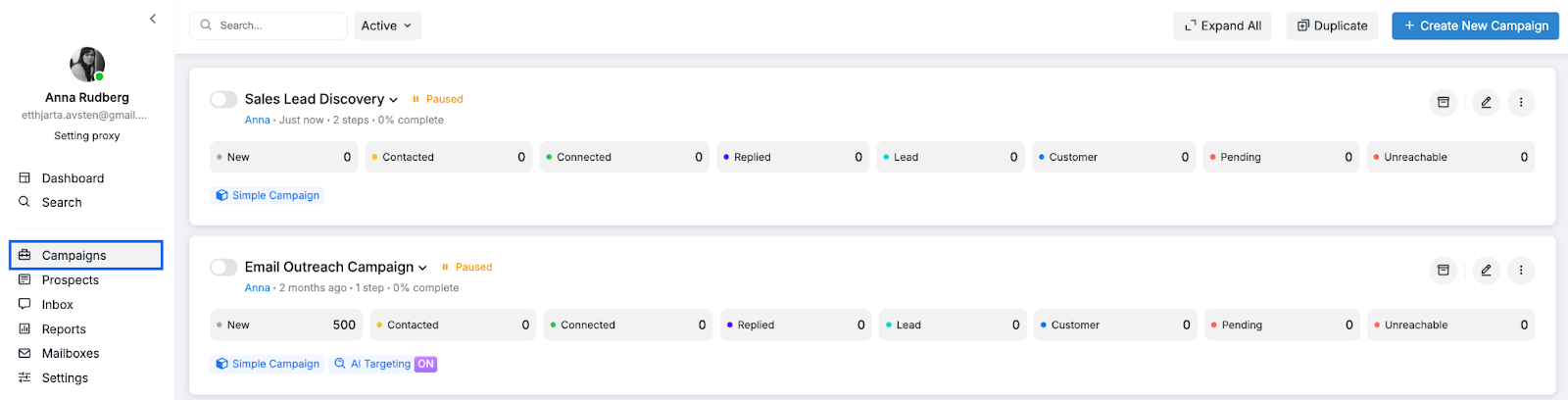
2. Find the campaign containing the searches you wish to rerun.
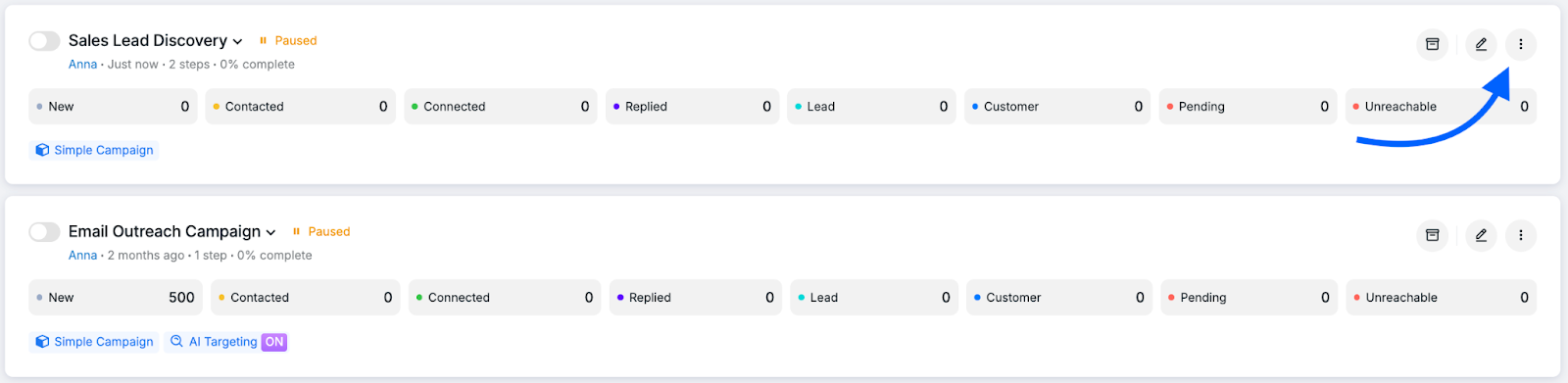
3. Click on the three-dot button next to the Edit icon on the far right of your selected campaign:
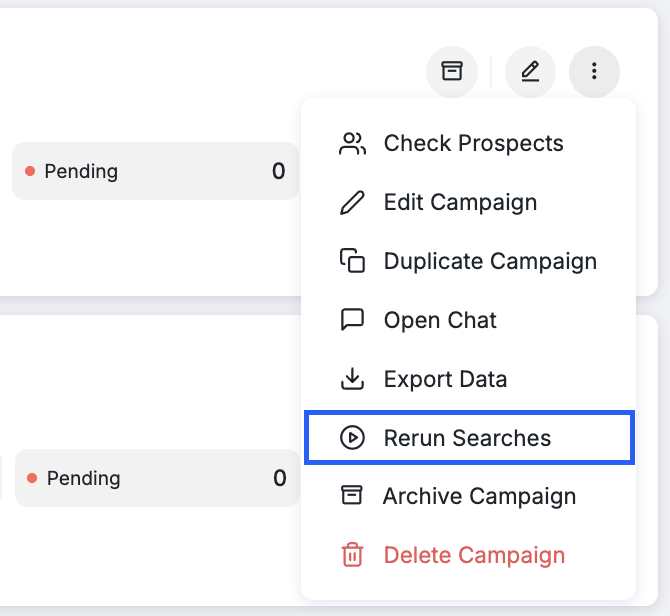
4. Click on Rerun Searches.
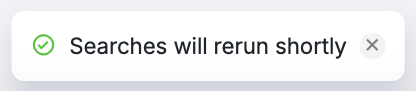
5. You will now see this message, and the system will be prompted to rerun your searches to pull in your prospects:
How Rerunning Searches Works
🛠 Fixing Search Issues
The rerun feature is typically used to resolve issues that arise during the Social search process. This includes cases where a dead proxy or other technical problems cause the system to skip pages, resulting in missing prospects. If your campaign shows no activity or appears stuck, rerunning searches is an essential troubleshooting step—particularly after proxy refreshes or when experiencing network glitches or server unavailability issues. If you've resolved a proxy issue, such as replacing a dead or unavailable proxy, rerun the search to capture any prospects that were missed during the initial search attempt.
📊 What to Expect After Rerunning
When you rerun searches, the number of new prospects added depends on whether your search contains prospects that haven't been pulled before. Keep in mind:
Prospects only appear in the "New" folder if they are being pulled from the search for the first time.
If your campaign has already pulled all available prospects from a search, rerunning it may add zero or very few new prospects.
Prospects that have already moved through campaign steps, to folders like "Invited" or "Replied," will not reappear in the "New" folder after a rerun.
A low number of new prospects after rerunning typically means your campaign has successfully processed most or all prospects from that search.
If you need more prospects, consider adding new search links to your campaign rather than rerunning existing searches that have already been fully processed.
Note: If prospects were manually moved from the current campaign to another campaign, the Rerun Searches feature will NOT pull them back, even if the "Add Prospects from Existing Campaigns" toggle is enabled. Manually moved prospects must be moved back manually to the desired campaign. This is an important consideration when troubleshooting why rerun searches isn't pulling in all expected prospects from your list.
❇ Adding New Prospects from the Same Search
Rerunning a search is helpful when the original search link contained a limited set of prospects (e.g., A, B, and C), and only some (A and B) were added to the campaign. If the client later updates the same search link to include more prospects (up to Z) and wants to add them to the campaign, rerun ensures that all newly available profiles are included while avoiding duplicates of existing ones. However, if certain profiles (e.g., G, D, and Z) are later removed from the search link and the rerun is performed, those profiles will still remain in the campaign.
🔦 Detecting Newly Added Profiles
Rerun is also useful when working with dynamic searches, such as event or group participant lists that continue to grow. Running a search again ensures that newly added profiles are captured and included in the campaign.
If you have any questions about rerunning your searches, please feel free to contact our Customer Support team.