Campaign Outreach Types: Multichannel vs. Email Only
Last updated: September 23, 2026
When creating a campaign in Buzz, you can choose between two types of outreach: Multichannel and Email Only. Each comes with its own flow, profile type logic, and configuration options.
This article breaks down the differences, available settings, and how profile creation behaves in each case.
What Are Multichannel and Email Only Campaigns?
Multichannel
This campaign type uses both the Social Platform and Email for outreach. The sequence can include Connection Requests, Social messages, follow-up emails, etc.
Email Only
This campaign type uses only Email outreach. It's ideal for cold email sequences or when the Social Platform isn't relevant or available for the target audience.
Company Data Management in Campaign Types
When choosing between Multichannel and Email Only campaigns, it's important to understand how company data and other profile information are managed differently in each type.
Multichannel Campaigns
Company names and other profile data are automatically fetched from the Social Platform and cannot be manually changed in Buzz. This means you'll always have the most current information from the Social Platform, but you cannot customize or correct this data within Buzz.
Email Only Campaigns
Profile data comes from your uploaded CSV file and is not automatically updated from external sources. This gives you full control over the data but requires manual maintenance to keep information current.
Adding Prospects to Email Only Campaigns
If you need to add prospects from the Search tab to an Email Only campaign, you have two options:
Option 1: Convert to Multichannel
Change the campaign type from Email Only to Multichannel. This enables Search tab functionality while still allowing you to use Send Email steps and other email outreach steps.
Important Limitation When Switching Campaign Types
If you switch a campaign's outreach type after profiles have already been added, existing profiles will retain their original type. Social profiles will remain social profiles, and email profiles will remain email profiles. The campaign type change only affects new profiles created after the switch.
This means if you start with a Multichannel campaign and later switch to Email Only, any social profiles already in the campaign will continue to behave as social profiles. To ensure all profiles follow the new campaign type's behavior, you would need to remove existing profiles and re-add them, or create a new campaign with the desired type from the start.
Option 2: Use a temporary Multichannel campaign
If you want to keep your campaign as Email Only:
Create a separate test Multichannel campaign.
Add prospects from the Search tab to the test campaign.
Export the prospects as a CSV file from the Prospects tab.
Upload the CSV file into your Email Only campaign.
Important limitation: Prospects from the Search tab, including LinkedIn searches, can only be added to Multichannel campaigns. For Email Only campaigns, prospects must be added via API requests or by uploading a CSV file.
Outreach Steps
The outreach steps available to you will vary depending on the type of campaign you choose.
Steps in Multichannel Campaigns
These campaigns support a combination of Social and email outreach, so you'll have access to the following steps:
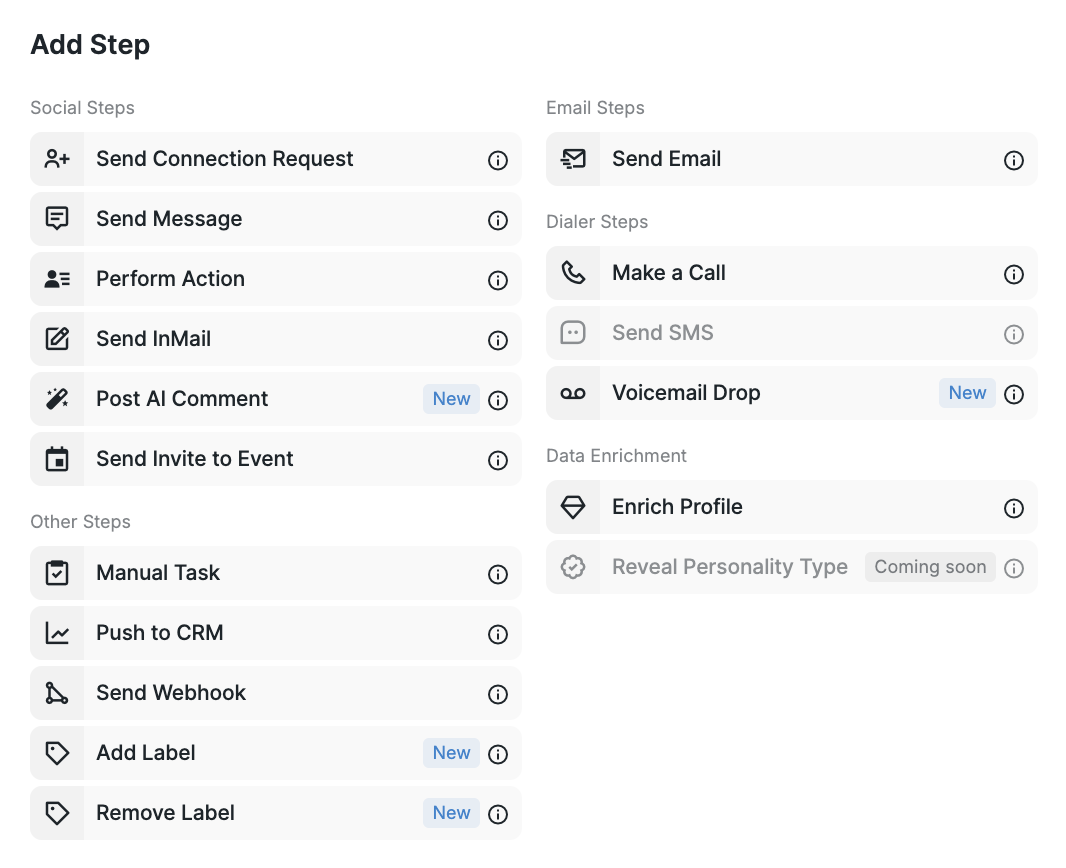
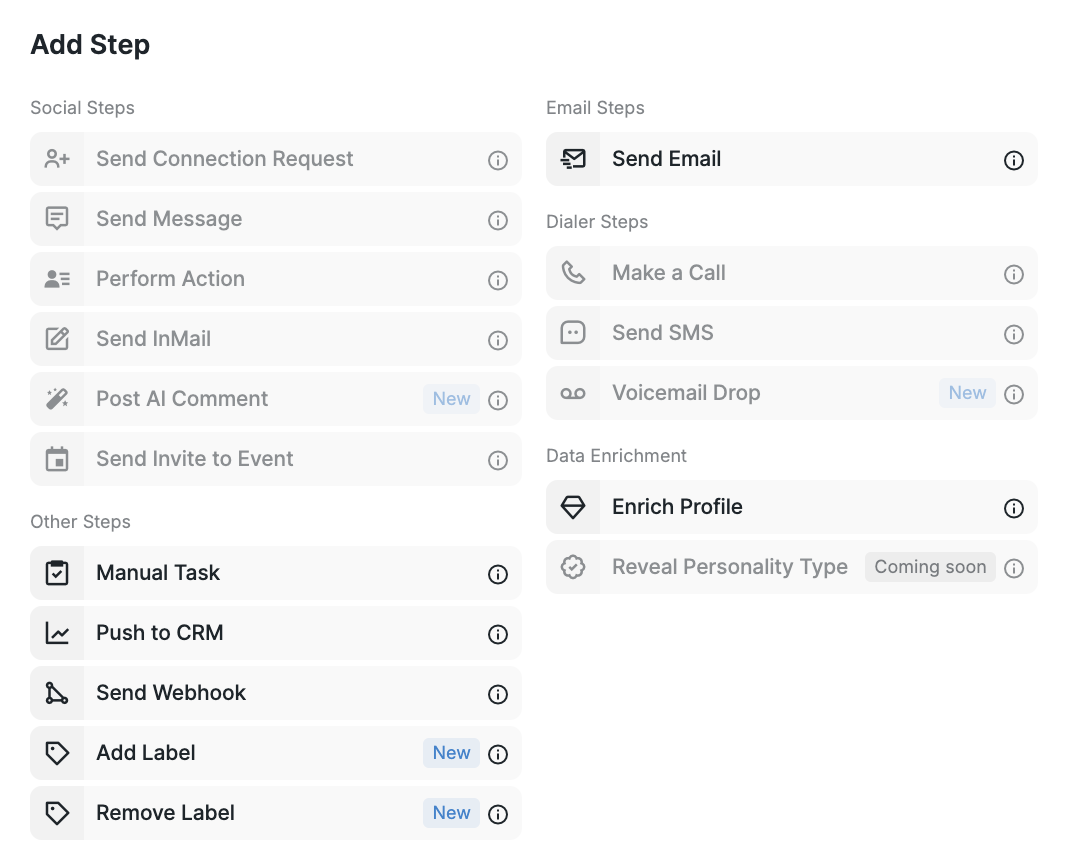
Steps in Email Only Campaigns
These campaigns are limited to email outreach, so there are fewer steps available in the sequence:
Note: When selecting the Email Only outreach type, the "Premium only" toggle is removed, as it applies exclusively to Social-based functionality.
Filtering by Outreach Type in Inbox
The Inbox allows filtering messages by channel — you can view only email responses, or just Social replies.
If you're unsure which campaign type fits your strategy, reach out to our Customer Success team — we’re happy to help!